In Creator Workspace, you can view and download performer ID and Consent Form documents on the following pages:
- Upload / Edit Clips
- Bulk Edit
- Performer Pages
- Banner / Avatar Management
Simply click the filename and the system will:
- Send a one-time password (OTP) to your email.
- Once the OTP is entered and verified, the document will open in a new tab, where you can view and/or download it.
- Each OTP is valid for 6 minutes and is a single-use.
- If your OTP expires, click the "resend OTP" button or click the filename again to have a new one resent.
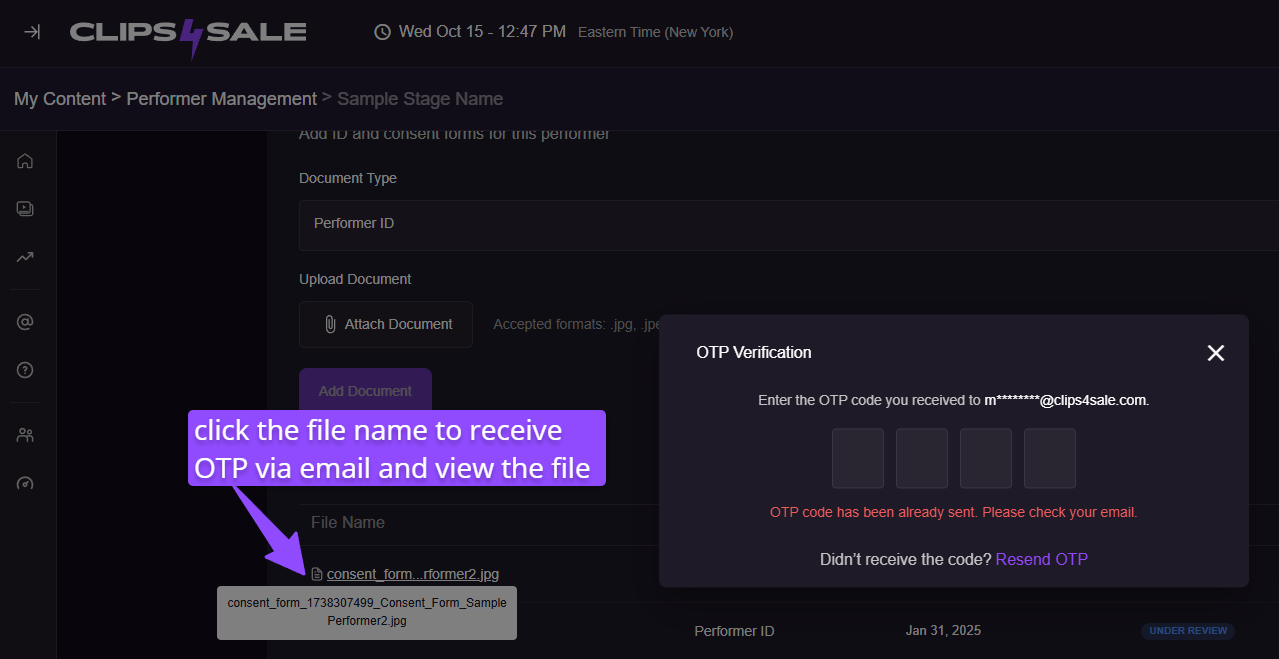
Didn't get the OTP email?
If you didn’t receive the OTP email needed to view your performer documents, try the following:
- Check your email address – make sure you’re signed in with the correct creator account.
- Look in your Spam or Junk folder – sometimes the email might land there.
- Wait a few minutes – delivery can take up to a few minutes, depending on your email provider.
- Don’t close the OTP pop-up – the code is valid for 6 minutes and must be entered in that same window.
- If you close the pop-up – Click the file name again to resend a new code if you still don’t see it.
- Still no email? Contact our Creator Experience team and mention you didn’t receive the OTP required to view your performer document. They’re available 24/7 and can be contacted via email, chat or phone!