The Hide/Unhide feature allows creators to manage their content visibility without permanently deleting it. When a clip is hidden, it is removed from the public (store page, search results, etc), but it's kept in the creator workspace. Creators can unhide a clip at any time to restore it to public view.
How It Works
To hide or unhide a clip, take the following steps:
- Navigate to the Creator Workspace → Content Management → All content.
- Locate the specific clip you wish to manage.
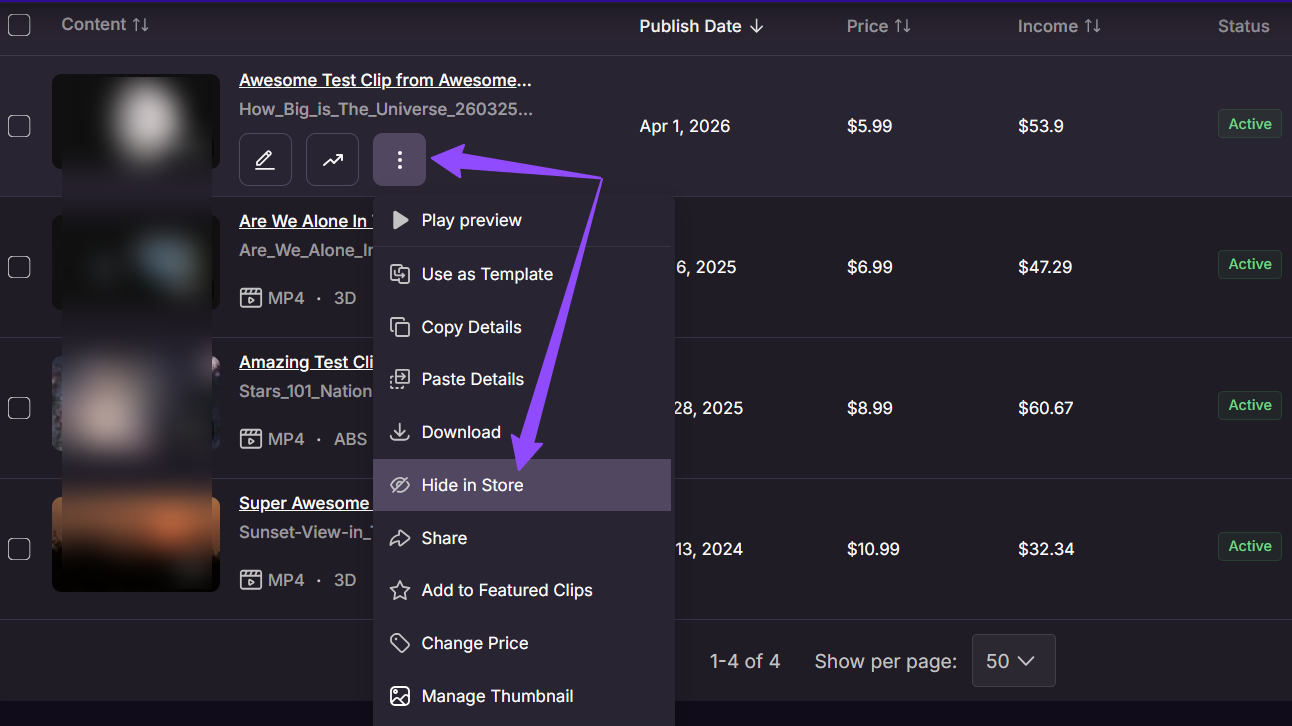
- Click the three-dot (⋮) menu.
- Select Hide in Store (or Show in Store if it is currently hidden) from the dropdown options.
Note: Due to website caching, it can take 15-30 minutes for the clip to fully disappear from the public store after you hide it.
(Also, keep in mind that this option will only appear for clips that are active!)