You can use the “Use as Template” feature to quickly copy metadata from one clip to another.
This allows you to reuse details like title, description, categories, keywords, thumbnail, preview, and more — which is especially helpful if you upload similar content regularly.
How It Works
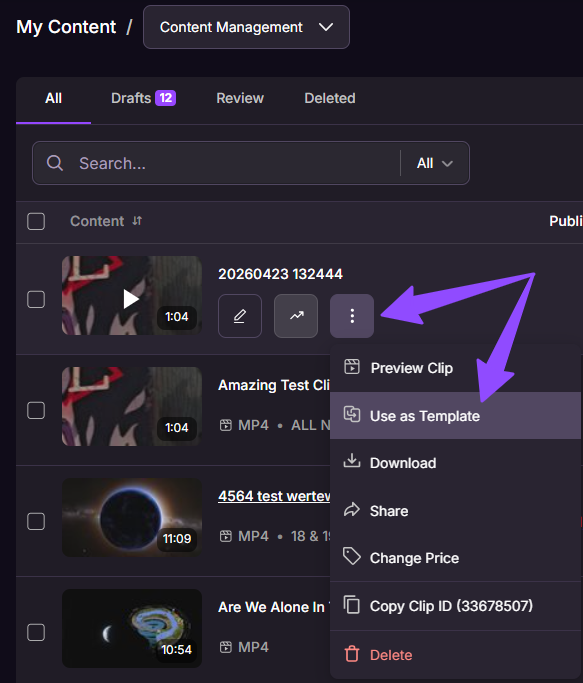
- Go to My Content > Content Management.
- Click the three-dot menu next to the clip you want to use.
- Select “Use as Template”.
- Select all or choose the details.
- Press the "paste details" button.
Details to Copy
• Title (with the word “copy” added to the original title)
• Description
• Primary audience
• Categories
• Keywords
• Performers
• Price
• Thumbnail
• Preview
Note: The newly cloned clip will initially be saved as a draft, so if you don’t want to publish it right away or schedule it, you can return to it and complete the publishing process later when you're ready.
If you have any questions or need help uploading your content, contact our Creator Experience Team. They’re available 24/7 and can be contacted via email, chat or phone!