What is the TipJar Link?
The TipJar Link is your personal tipping page on Clips4Sale. Fans can use it to send you tips directly as a way to support your work.
You receive 80% of all tips sent through your TipJar Link.

Where to Find Your TipJar Link
You can easily copy your TipJar Link from the Creator Workspace:
- Open Creator Workspace (CW).
- Go to Promote and you'll find your TipJar link under Quick Links.
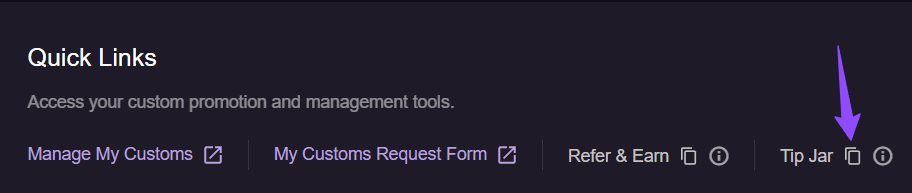
- You can also go to your store’s main menu (right-click menu).
- Click Copy TipJar Link to copy your link for sharing.
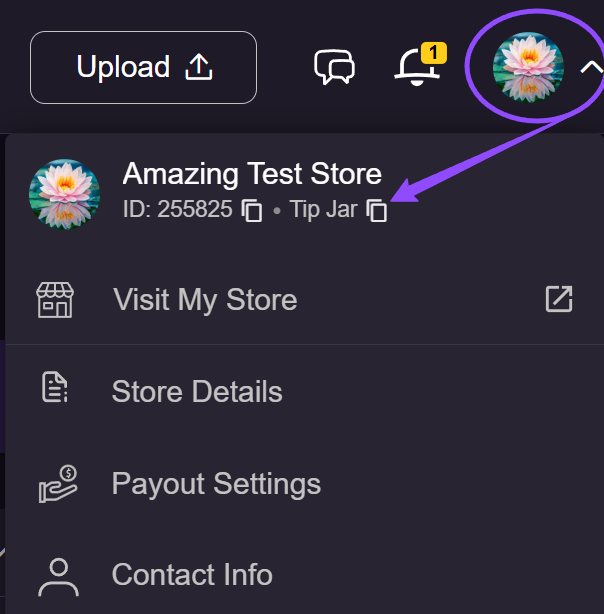
You can also manually access your page using this format: https://tj.clips4sale.com/[store_id]
(e.g., https://tj.clips4sale.com/255825)
How to Share Your TipJar Link
You can share your TipJar Link wherever you connect with fans:
- Emails – Include it in newsletters or messages.
- C4S Chat & Bulk Messages – Share directly with your subscribers.
- Social Media – Add it to posts, stories, or your bio.
- Clip Descriptions – Encourage tipping directly from your store.
Sharing your link is an easy way for fans to support you and show appreciation for your work.